 Flip Screen

Flip Screen
A Touch Bar for your Mac, on the glass.
Lay your touchscreen MacBook Pro flat and it becomes a tabletop.
Pro The Touch Bar comes with Pro. Needs a touchscreen MacBook Pro on macOS 27.

Saturday
Farmers market at ten.
Dinner at eight.



Four pages, a swipe apart.
It sits along the edge nearest you, above the camera. Swipe it to change page. Start typing and it becomes the keyboard's typing bar.
-
This app
Controls for the app in front, with Write one tap away.
-
Apps
Your open apps. Tap one to bring it forward.
-
Media
Previous, play and next, for whatever is playing.
-

Desk
Mission Control, your desktops, a screenshot and Lock.
Pro
Write on it.
Handwrite with your finger anywhere on the screen and it's typed into the box you're in. Scribble over a word to delete it. Or switch to Sketch and paste your drawing anywhere.

Type by touch
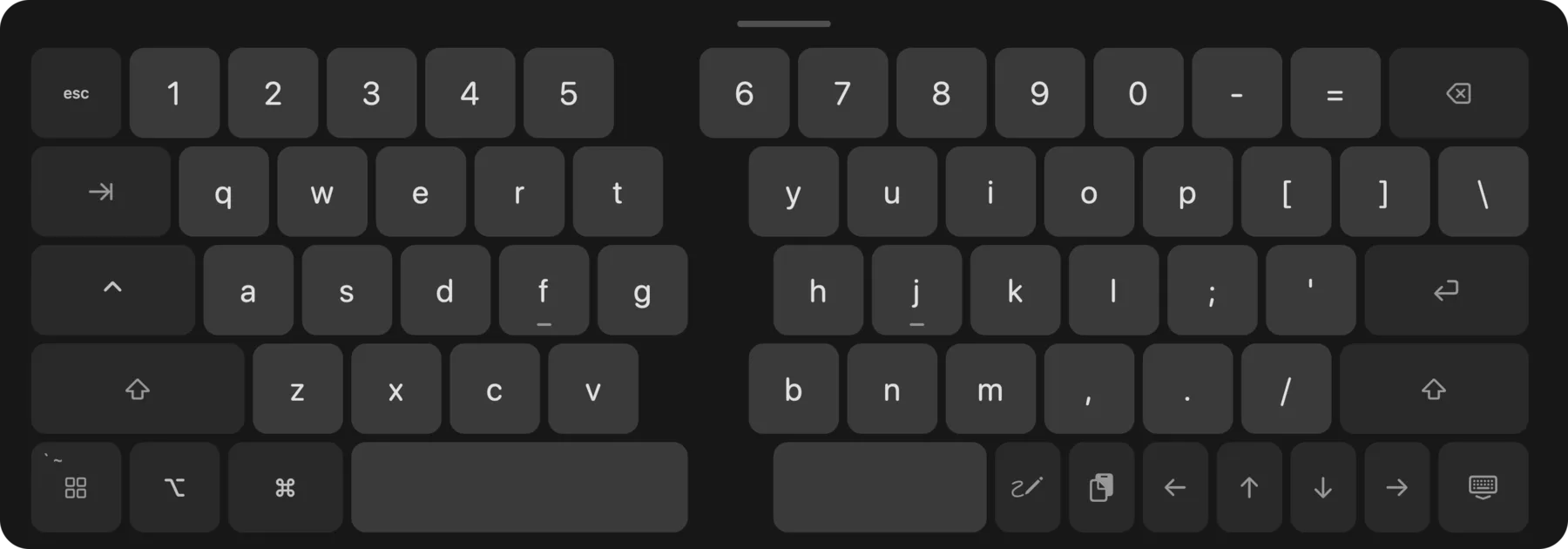
Tap a text box and a full-size keyboard slides up, split down the middle with MacBook key spacing and the line you're typing right above it. With Pro you also get word suggestions and autocorrect, and you can hold the space bar to move the cursor like a trackpad.
Everything else
-
Edge controls Pro
Slide along the left edge for brightness, the right edge for volume.
-
Apps key Pro
Your open apps, one tap away, right on the keyboard.
-
Clipboard key Pro
Your last ten copies. Tap one to paste it.
-
Looks and sounds Pro
Graphite, Light or Amber keys, with key sounds if you want them.
-
Cut, Copy, Paste
They appear over the text you select.
-
Flip from anywhere
Control-Option-Command-F turns the screen whenever you want it.
-
Private
It collects nothing and makes no network connections.
Set it down like this.
Lay the screen flat on the table and let the keyboard half lean back over it at about 45°. Open it further and it can tip backwards.
Free, with one paid extra
Flip Screen
Free
- Turns to face you when you lay it flat
- Full-size keyboard, with the line you are typing above it
- Cut, Copy and Paste on selected text
- Flip from anywhere with ⌃⌥⌘F
Pro
$9.99 once
- A Touch Bar on the glass, with four pages
- Write: handwriting into any text box
- Brightness along the left edge, volume along the right
- Word suggestions and autocorrect
- Hold the space bar to move the cursor
- Apps key: your open apps, one tap away
- Clipboard key: your last ten copies
- Keyboard looks and key sounds
- Every Mac you own
- Refund within 30 days
Paid through Stripe. No subscription.
Questions
- Which Macs?
- The touchscreen MacBook Pro, on macOS 27.
- Does it need any permissions?
- Accessibility, to bring up the keyboard when you tap a text box. What you type never leaves your Mac.
- Is it a subscription?
- No. The app is free, and Pro is $9.99 once.
- What if a macOS update breaks it?
- It relies on parts of macOS that Apple may change. We update it, and you can get a refund within 30 days.
- Can I use Pro on all my Macs?
- Yes. One purchase unlocks it on every Mac you own.